We will be doing a lot of hands-on MNE-Python programming during this week. Therefore, it is important you bring a good working laptop with MNE-Python installed on it. It is crucially important that you take the time beforehand to install and test everything, because it can take a significant amount of time to figure these problems out on site and you will miss the best parts of the workshop. We may not have sufficient time during the workshop itself to help with everyone’s installation issues (the program is packed!)
So, don’t wait until the last minute, but go and check right away the “Before You Arrive” instructions in the README: https://github.com/wmvanvliet/mne_practical_meeg_2025 . Follow the instructions to install MNE-Python on your system and use notebook 0-Installation_check.ipynb to test whether your installation is in good working order. If something is not working, please post on this forum to seek help. We will be available the coming week to help resolve installation issues.
First of all thank you for all the informations and guides provided.
I have followed the instructions on the github read me.
I am on Windows 11, I used VSCode to open and run 0-Installation_check.ipynb, everything runs ok except the last cell which has thrown an error:
ValueError: Error loading surface from c:\Users\…\mne_practical_meeg_2025-main\extra_data_mne\freesurfer\sub-01\bem\outer_skin.surf (see Terminal for details).
When I go up in the exception chain I see this error:
ValueError: File does not appear to be a Freesurfer surface
Thank you for letting us know to prepare ahead of the workshop.
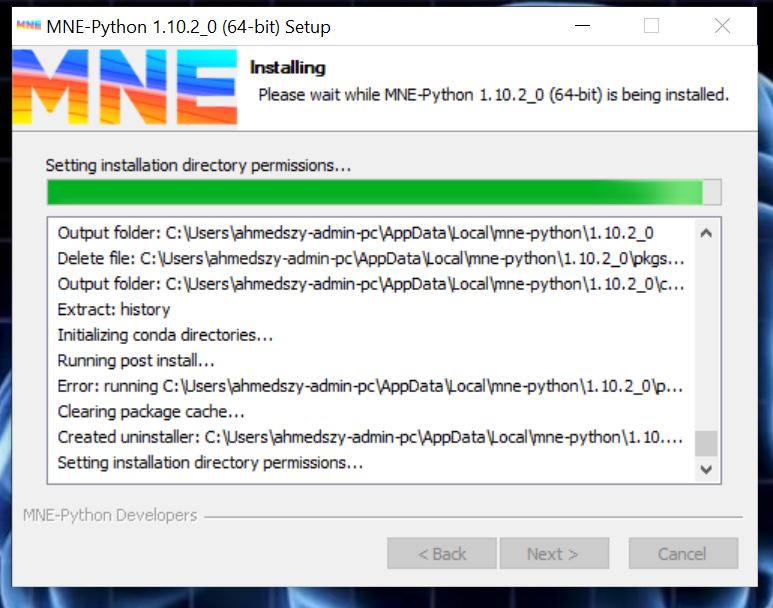
I have been able to download all the data but when it comes to download the MNS-Python on my Windows laptop it does not work and is been for more than 24 hours in this screen I attached here. It does not allow me to move forward or backwards. Is literally froze in there. My IT team looked into it today and they were unable to solve it. I will go back tomorrow to see if we can short it out but otherwise do you have any advise? I am starting to panic a little bit. Please let me know when you can. Best wishes, Sonia GL
Step 2: It looks like you are using the graphic installer, it’s not really giving a lot of information what goes wrong, tricky… so maybe one way would be to use the second, more manual way of installing MNE-python: https://mne.tools/stable/install/manual_install.html See if you can follow the steps here, and if there is something where you cannot continue, report back!
Thank you so much Natalie, I gonna meet my IT team to see if they can unfreeze the downloading screen where it got stuck, and will try the steps you suggested. Will let you know as soon as I figure it out. Best wishes, Sonia GL
The graphical installer is a bit notorious for not displaying progress properly and installation indeed does take a lot of time, but not 24h… I hope the “manual” way works out for you. Let us know if it did.
Hello Natalie and Marijn,
thank you for all the detailed instructions.
I followed the preparatory guidelines step-by-step. Every command of the installation check works in my case (I am using Spyder) apart from this:
The console gives me back the following error:
[…] File C:\ProgramData\miniconda3\envs\mne_python\Lib\site-packages\mne\coreg.py:735, in _find_fiducials_files(subject, subjects_dir)
733 for path in iglob(pattern):
734 match = re.match(regex, path)
→ 735 head = match.group(1).replace(subject, “{subject}”)
736 fid.append(pformat(fid_fname_general, head=head))
737 return fid
AttributeError: ‘NoneType’ object has no attribute ‘group’
It seems like the regex pattern in MNE’s _find_fiducials_files function isn’t matching the expected file paths.
What works for me is adding these lines suggested by Claude before it
# Store original function**
_original_find_fiducials = coreg._find_fiducials_files
def _patched_find_fiducials(subject, subjects_dir):
try:
return _original_find_fiducials(subject, subjects_dir)
except AttributeError: ** # Return empty list if no fiducials found**
return # Apply patch
coreg._find_fiducials_files = _patched_find_fiducials**
Do you think there are more appropriate solutions to my problem?
Thank you in advance for your time and help
Alessandra
Hi Loretan I am familiar with Matlab and because of the spyder inter face like matlab, I want to use it. I install spyder but I can not open files with mne python. If anyone help me I thank full


 We may not have sufficient time during the workshop itself to help with everyone’s installation issues (the program is packed!)